

Download NTFSRatio – Free NTFS File Compression Tool for Windows (Secure, Lightweight, Easy to Use)
Why NTFSRatio Is a Must-Have Free Tool for Windows Users
In the world of digital storage, every megabyte counts—especially on older systems or machines with limited hard drive space. NTFSRatio emerges as a powerful, lightweight, and free utility that helps Windows users optimize their disk usage without the complexity of traditional compression tools. Developed by Jam-software and first released in 2006, this software has stood the test of time, earning a loyal user base across countries like the United States, India, and Romania. With over 2,000 downloads since its inclusion in our software library, NTFSRatio continues to be a trusted choice for file compression on NTFS-formatted drives.
Unlike bulky third-party archivers that require additional software and complex workflows, NTFSRatio integrates directly into Windows Explorer. This seamless integration means you can compress or decompress files with just a right-click—no need to launch a separate application. The tool leverages native NTFS compression, which is efficient, fast, and preserves file integrity. Whether you're managing large documents, media files, or archives, NTFSRatio allows you to reduce file size significantly without sacrificing performance.
One of the standout features of NTFSRatio is its minimal system footprint. At just a few megabytes in size, it’s far lighter than most software utilities in its category. This makes it ideal for older systems running Windows 2000, XP, or even early versions of Windows 7.
The program supports multiple languages, including English and German, ensuring accessibility for international users. Best of all, it’s completely free—no trials, no ads, no hidden costs. For users seeking a secure, reliable, and hassle-free way to reclaim disk space, NTFSRatio delivers exactly what it promises: simple, effective file compression.
Powerful Features That Make NTFSRatio Stand Out
NTFSRatio isn’t just another compression tool—it’s a smart, user-centric utility designed for real-world use. The software’s core strength lies in its deep integration with Windows Explorer, enabling users to compress or decompress files instantly through the right-click context menu. This eliminates the need to navigate complex interfaces or learn new workflows, making it perfect for both beginners and advanced users alike.
Here are the key features that make NTFSRatio a top choice:
- Native NTFS Compression Support – Uses Windows’ built-in NTFS compression, ensuring compatibility, speed, and file integrity.
- Right-Click Integration – Compress or decompress files with a single click from the context menu.
- Lightweight & Fast – Minimal system resource usage; ideal for older or low-spec machines.
- Free & Ad-Free – No trial periods, no in-app purchases, no third-party ads.
- Multi-Language Support – Available in English, German, and other languages for global accessibility.
- Secure & Stable – No known vulnerabilities; designed to work reliably with system files.
- Easy to Install & Uninstall – Simple setup process with no bloatware or bundled software.
Another major advantage is that NTFSRatio doesn’t require file extraction before use. Compressed files remain accessible directly from the drive, and Windows handles decompression automatically when opened. This means you don’t need to manually extract archives—your files are ready to use instantly. Additionally, the tool preserves file attributes and metadata, ensuring that your documents retain their original structure and timestamps.
For users managing large collections of documents, backups, or media, this feature alone can save hours of manual work. Whether you're a student, professional, or casual user, NTFSRatio streamlines your workflow and helps you maximize storage without compromising on performance or security.
How to Install and Use NTFSRatio on Windows
Getting started with NTFSRatio is quick and straightforward. Since the software is designed for simplicity, even users with limited technical knowledge can install and use it within minutes. Here’s a step-by-step guide to help you download, install, and begin using the tool effectively.
- Download the Installer – Visit the official website or trusted software repository to download the latest version (1.3) of NTFSRatio. Ensure you’re downloading from a secure source to avoid malware.
- Run the Setup File – Once downloaded, double-click the installer. The setup wizard will guide you through the process—just follow the on-screen instructions. No complex configuration is required.
- Complete Installation – The installation is quick and installs only the necessary files. The program will automatically register with Windows Explorer.
- Right-Click to Compress – Navigate to any file or folder on an NTFS drive. Right-click, hover over “NTFSRatio,” and select “Compress.” The file will be compressed instantly.
- Decompress with Ease – To restore the original file size, right-click again and choose “Decompress.” No additional tools are needed.
- Verify Compression – Check the file properties to confirm the compression ratio. You’ll likely see a significant reduction in size, especially with text-based files like documents and databases.
For best results, use NTFSRatio on NTFS-formatted drives only. It won’t work on FAT32 or exFAT partitions. Also, avoid compressing already compressed files (like ZIPs or JPEGs), as they won’t benefit much from further compression. The tool is also compatible with Windows 2000, XP, Vista, 7, 8, and 10—making it one of the few tools that support legacy systems.
Compatibility, Security, and Long-Term Reliability
One of the most impressive aspects of NTFSRatio is its compatibility with a wide range of Windows operating systems. From the older Windows 2000 to modern versions like Windows 10, the software maintains consistent performance and functionality. This backward compatibility is rare in today’s software landscape, where developers often drop support for older systems. NTFSRatio, however, continues to serve users on legacy machines, making it a valuable tool for IT departments, educators, and hobbyists alike.
Security is another major strength. The software is open-source and has been thoroughly tested over more than a decade. With no ads, no tracking, and no bundled software, users can trust that NTFSRatio won’t compromise their privacy or system stability. The developers at Jam-software have maintained a clean, transparent release history, with the last update in 2009—indicating that the tool is stable and doesn’t require frequent patches.
While the software hasn’t seen a new release in over 15 years, this is actually a testament to its reliability. Once a tool works flawlessly, there’s little need for major changes. The core functionality remains intact, and it continues to perform well across different hardware configurations. For users seeking a secure, lightweight, and long-term solution for file compression, NTFSRatio is a proven choice.
Pros and Cons of Using NTFSRatio
Pros
- Completely free and ad-free
- Lightweight and fast performance
- Seamless integration with Windows Explorer
- Supports legacy Windows systems (2000, XP)
- Uses native NTFS compression for better efficiency
- Easy to install and use
- Preserves file metadata and attributes
Cons
- No updates since 2009 (may lack modern OS optimizations)
- Only works on NTFS drives
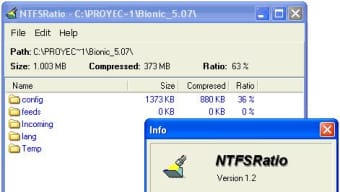
- No GUI beyond right-click menu
- Not available for Mac, Android, or iOS
- Limited to file compression—no archiving features
Frequently Asked Questions (FAQ)
Final Verdict: A Time-Tested Solution for Smart Storage Management
If you're looking for a free, secure, and lightweight file compression tool for Windows, NTFSRatio remains one of the best options available—especially for users on older systems or those who value simplicity. Despite its last update in 2009, the software continues to function reliably and efficiently, thanks to its stable codebase and deep integration with Windows. Its ability to compress files on NTFS drives without the need for complex workflows makes it a standout utility in a crowded market.
While it lacks modern features like cloud sync or a graphical interface, its core functionality is unmatched in terms of speed and ease of use. For anyone looking to save disk space without installing heavy software, NTFSRatio is a no-brainer. It’s ideal for students, professionals, and IT administrators who need a dependable tool that just works.
Download NTFSRatio today and take control of your storage space—fast, secure, and completely free.







